


| Site | Description | Login Information |
|---|---|---|
| Solomon | Includes everything you need to know about Reliant's policies and processes | You do not login to Solomon. Everything you need is accessible under the Field Manual tab. Access code, if needed, is IAMRELIANT. |
| Reliant.org | Edit your giving page. | Username = your personal email address Password = what you used when creating a reliant.org account |
| Toolbox | View your fund, gift information, and reimbursement payouts. |
Launch Checklist
Log in to Reliant Email
Accessing Your Reliant Email
Your Reliant email is your vehicle for all official Reliant communication and will be used to verify your identity on various documents throughout your employment. Check it regularly! Here’s how to access that account:
- Access your email by going to gmail.com.
- Click the button for “Sign In” (NOT “Create Account”) and use the email address sent to you by the Program Liaison, and the temporary password: “Reliant12345”.
- Note: If you already have a Gmail account, click the “Add Another Account” button
- From there, you should be directed to change your password. If it doesn’t, click the button in the top, right corner (will usually be your picture or your first initial) and go to your account settings.
A Few Tips
- If using an email client such as Apple Mail or Outlook, you can link all your inboxes together for easy access. Check out this Solomon page for more info.
- If you only use Gmail, you can quickly swap between gmail accounts via the round “Google Account” button at the top, right corner.
You can edit how your name displays when you send emails. Go to your Google Account > Personal Info > Name > Edit. You may choose to edit this to the name you go by (if different from your legal first name) or a secure name such as your initials.
Send Test Email
Email us at international@reliant.org to test your new email!
Add Support Goal to Toolbox
You may notice an unusual result or an unexpected goal, but don’t worry—we’ll take care of it on the backend. The system is designed for the intern to submit the goal. Once submitted, it will be reviewed and edited by the International team for approval. After approval, the total goal of $9,600 will appear on your dashboard so you can track your giving progress.
Go to Toolbox
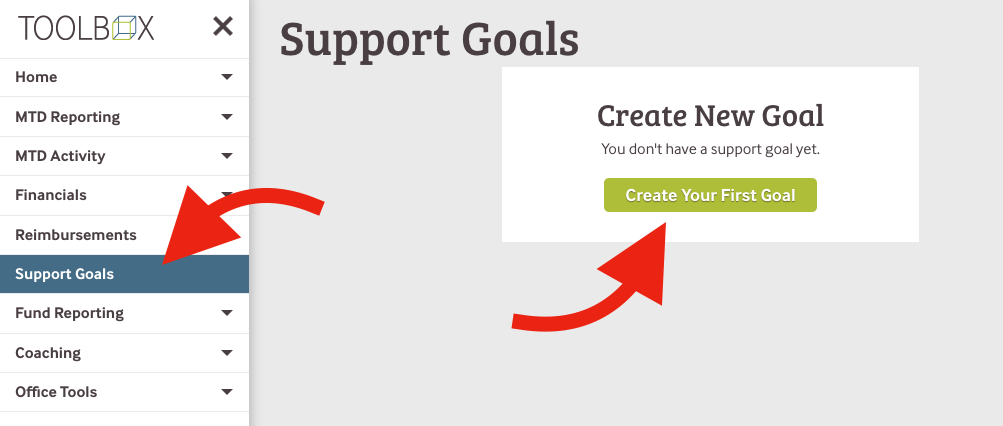
Click Support Goals > Create Your First Goal.
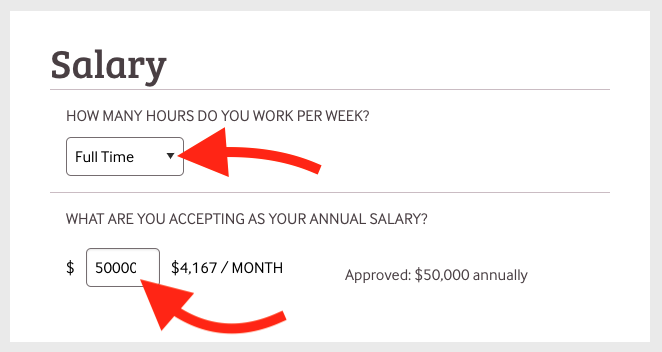
- Select Full Time from the dropdown, even if you are Part Time.
- Insert your approved salary as your accepted salary. If a number is pre-filled, you can leave it as is. Do not use $ or a comma.
- This number is likely different than your expected or desired salary. We will correct this when we approve your support goal.
Click Submit.
*You can skip all of the other boxes. The international team will update all of those numbers for you.
Add Direct Deposit Info
Go to Toolbox > Employment > Direct Deposit.
For additional help, go to Toolbox Direct Deposit.
Update Giving Page
How to Give
The best and easiest way to have your donors give is by directing them to your giving page link. They will be asked to set up an account on reliant.org to manage their giving.
USPS Postmark Policy
Beginning Dec. 24, 2025, the U.S. Postal Service will no longer apply postmarks at local mailboxes or post offices. Instead, postmarks will be added later at regional processing centers — sometimes days after mail is dropped off.
Due to changes in mail processing, the postmark on an envelope may not always reflect the actual date a gift was mailed. This means the date we receive the donation determines when it can be counted — whether for a specific month or year (for tax purposes).
If you plan to mail a check near the end of a month or year and want it credited to that period, please take steps to ensure the mailing date can be verified. Dropping a check in a mailbox or using a self-service kiosk may not provide proof under current USPS processes.
To help ensure timely crediting, consider:
- Bringing your envelope to a USPS counter and requesting a manual (local) postmark
- Purchasing postage with a Postage Validation Imprint (PVI)
- Using Certified or Registered Mail or requesting a Certificate of Mailing
If a donor would like to make a gift by check, here’s what to tell them:
Make the check payable to:
ReliantMemo line:
Include your name, the ministry/project name (if applicable), and your 4-digit Fund NumberMail the check to:
Reliant
11002 Lake Hart Dr, Ste 100
Orlando, FL 32832
💡 Tip: Encourage donors to send checks directly to Reliant to ensure accurate tracking and timely receipting.
If a donor gives you the check directly:
Please forward the check (along with the original envelope, if possible) to Reliant at the address above.
If a donor sends a check to you instead of to Reliant, follow these steps:
🚫 Do not deposit or hold the check.
Verify that the check is filled out correctly:
Payable to Reliant
Your name (or the ministry/project) and 4-digit Fund Number on the memo line
Forward the check (and original envelope, if available) to:
Reliant
11002 Lake Hart Dr, Ste 100
Orlando, FL 32832
💡 Tip: Kindly thank the donor and suggest they send future checks directly to Reliant for the smoothest experience.
💡 Tip: If possible, kindly ask the donor to void the check and write a new one made payable to Reliant. This helps ensure accurate tracking and allows the donor to receive an official donation receipt.
If they’re unable to reissue the check, follow these steps:
Deposit the original check into your personal bank account
Purchase a money order or cashier’s check for the exact donation amount
Make it payable to:
ReliantMail the money order or cashier’s check to:
Reliant
11002 Lake Hart Dr, Ste 100
Orlando, FL 32832
You can usually purchase a money order at places like the post office, 7-Eleven, Walgreens, CVS, most grocery stores, or Walmart.
Follow these steps to complete it correctly:
Pay To:
Write Reliant in the “Pay To” field. If it’s blank, you may handwrite the name.Add the mailing address:
Reliant
11002 Lake Hart Dr, Ste 100
Orlando, FL 32832From/Sender:
Write the donor’s full name and addressMemo:
Include your name and your 4-digit Fund NumberSignature (Front Only):
If there’s a signature line on the front, sign your name.
🚫 Do not sign the back of the money order.
💡 Addtional Tips:
The money order should match the exact donation amount.
There may be a small fee, which you’ll need to pay up front.
You may be eligible for reimbursement—check the Reimbursement section or contact reimbursements@reliant.org with any questions.Tear off and keep the receipt for your records.
Yes—but only in certain currencies.
Reliant can accept international checks in the following currencies:
🇨🇦 Canadian Dollar (CAD)
🇬🇧 British Pound (GBP)
🇪🇺 Euro (EUR)
💡 Tip: If the donor’s check is in any other currency, please encourage them to give online using a credit card at Reliant.org
For large gifts or if the donor prefers not to give by credit card, ask them to reach out to Donor Services at donor.services@reliant.org to explore other options.
Related pages
💡It’s best to encourage donors to give online or by check when possible, rather than in cash—this helps ensure accurate tracking and smoother processing.
Kindly ask the donor if they’d be open to giving their gift online or by check (made payable to Reliant). Let them know this helps us track their donation accurately and ensures they receive a proper receipt to acknowledge their generosity.
If a cash gift is the only option, follow these steps:
Deposit the cash into your personal bank account.
Purchase a money order or cashier’s check for the exact donation amount.
Make it payable to Reliant.
Mail the money order or cashier’s check to:
Reliant
11002 Lake Hart Dr, Ste 100
Orlando, FL 32832
You can usually purchase a money order at places like the post office, 7-Eleven, Walgreens, CVS, most grocery stores, or Walmart.
Follow these steps to complete it correctly:
Pay To:
Write Reliant in the “Pay To” field. If it’s blank, you may handwrite the name.Add the mailing address:
Reliant
11002 Lake Hart Dr, Ste 100
Orlando, FL 32832From/Sender:
Write the donor’s full name and addressMemo:
Include your name and your 4-digit Fund NumberSignature (Front Only):
If there’s a signature line on the front, sign your name.
🚫 Do not sign the back of the money order.
💡 Addtional Tips:
The money order should match the exact donation amount.
There may be a small fee, which you’ll need to pay up front.
You may be eligible for reimbursement—check the Reimbursement section or contact reimbursements@reliant.org with any questions.Tear off and keep the receipt for your records.
No. For transparency and proper record-keeping, all cash gifts—regardless of the amount—must be converted into a money order or cashier’s check and sent to:
Reliant
11002 Lake Hart Dr, Ste 100
Orlando, FL 32832
This ensures the gift is properly tracked and acknowledged.
You can respond with something like:
"Thank you so much for your generosity. As a missionary with Reliant, I’m required to send any donations I receive directly to Reliant. This ensures we maintain integrity in our donation process and remain in good standing with the IRS."
If the donor is adamant about not wanting their gift sent directly to Reliant, you can process it as an anonymous gift.
Yes, the gift will be tax-exempt as long as you include the donor's information with the money order or cashier's check. This ensures the donation can be properly tracked and receipted for tax purposes.

