


Page History
Hourly Time Cards
Reliant employees working
Reliant has two types of time cards, which are required depending on a missionary's status.
Monthly Time Card
Who must submit: Part-Time Reliant missionaries who work, on average, fewer than 20 hours /week (see Missionary Classifications) are required to turn in the hourly time card. These Timecard employees are paid based on the number of hours worked per their timecard, even if that amount differs from their support goal.
When submitted: Monthly (see due dates below)
How to submit: See instructions below
per week must report their hours worked to Reliant using a time card. This is done each month based on the process below and the deadlines established each year. These can be found on your time card as well as listed below. Per Reliant's Paid Time Off (PTO) & Holidays policy, those employees working fewer than 20 hours per week are not eligible to receive PTO or paid holiday hours and should not include these hours on their time card.
| Note |
|---|
Reliant employees who work |
| Note |
Reliant missionaries who are working Full-Time, PT-30, PT-25, or PT-20 (see Missionary Classificationssee Field Staff Statuses) are not responsible to report for reporting back to the Reliant office how their time is spent in accomplishing job responsibilities. However, your local church or ministry may require some form of regular feedback for how you are using your hours and accomplishing your roles. Reliant employees are responsible to follow any guidelines set by the for following any local church or ministry guidelines for accountability in roles or hours. |
...
Time Card
...
Exception/Late Time Card Process and Implications:
Exception/late time cards will be approved and paid as part of an exception process. Your supervisor will be informed that this is the (X) time a late/exception time card has been submitted for the year. Reliant hourly employees are responsible to report their hours to Reliant within the Time Card Deadlines listed below.
If a missionary submits 3 exceptions/late time cards within a year, Reliant will work with local leadership to discuss a corrective action plan or disciplinary action plan, depending on the circumstances. In extreme cases, Reliant may exit an hourly employee to Associate staff if non-compliance with the time card submission process and deadlines has been a recurring problem without acceptable corrective action taken on the part of the missionary. In cases in which the local supervisor is unable to resolve the situation effectively, additional regional leadership may be made aware of the situation to assist Reliant with a resolution.
For more information or the links to the Exception time cards see Exception Time Cards.
Backpay Restrictions (unable to be paid out)
Reliant hourly employees must have submitted a time card by the deadline in order to be eligible to receive backpay the next month (this rule applies to both employees in the scenario of a dually employed couple). No backpay may be paid if a time card was not received or if a time card was received late.
...
Deadlines
| Time Card Deadlines for 2026 | ||
| End of time period | Submission Deadline | Pay Date |
| 1/31/2026 | 2/1/2026 | 2/13/2026 |
| 2/28/2026 | 3/1/2026 | 3/13/2026 |
| 3/31/2026 | 4/1/2026 | 4/15/2026 |
| 4/30/2026 | 5/1/2026 | 5/15/2026 |
| 5/31/2026 | 6/1/2026 | 6/15/2026 |
| 6/30/2026 | 7/1/2026 | 7/15/2026 |
| 7/31/2026 | 8/1/2026 | 8/14/2026 |
| 8/31/2026 | 9/1/2026 | 9/15/2026 |
| 9/30/2026 | 10/1/2026 | 10/15/2026 |
| 10/31/2026 | 11/1/2026 | 11/13/2026 |
| 11/30/2026 | 12/1/2026 | 12/15/2026 |
| 12/31/2026 | 1/2/2027 | 1/15/2027 |
Submitting an
| title | How to submit a Monthly Time Card |
|---|
Hourly Time Card
Instructions for the first time you are opening the Hourly Time Card file
Make sure you are logged- Log into your Reliant Google Account on this browser. You can do this at mail.reliant.org or drive.reliant.org.
- Open the file titled: Last name, First Name (Your Name) (Current Year) Time Card
- shared with you by
- timecards@reliant.org.
- To make the file easier to find, you can bookmark the sheet to your browser or add it to your Google Drive by selecting "File" from the top menu bar then " Add to My Drive."
- Proceed to the instructions below
Instructions for submitting your time card for approval every month
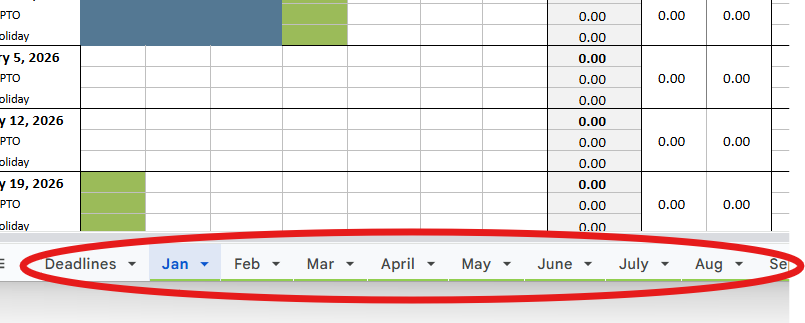
- Enter your daily hours for the
- current month (months are separated by tabs at the boom of the workbook).
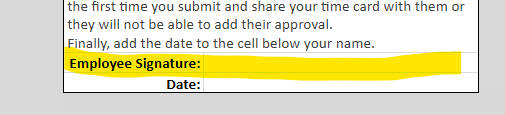
2. Next to the cell that says, "Employee Signature,"
In the Missionary Approval blank,type your full name.

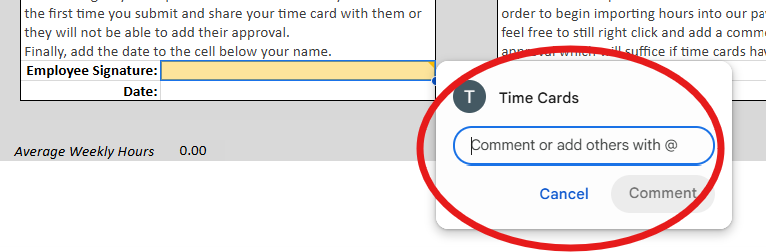
3. Right-click the
MissionaryEmployee Approval cell and select "
insertcomment," then type: "
+@timecards@reliant.org I am submitting this time card" and select the
blue"Comment" button to submit
your commentthe time card to Reliant's Time Card Inbox.
4. Click the comment box again, and in the
Replyreply box, type
"+firstname.lastname@reliant.org (substitutingthe following, "@yoursupervisorsemail.org Please approve this time card." Click the "reply" button to submit the time card to your supervisor's email
) Please approve this time card" and click the blue Reply button to submit your reply.inbox.
NOTE: Be sure to give your supervisor EDITING access to your time card the first time you submit and share your time card with them or they will not be able to add their approval.
5. Finally, add the date to the cell below your name.
6.
Your supervisor will then need to follow the instructions within the form (
seesee Supervisor Approval) to type their name in the Supervisor Approval Box and to add a comment stating, "I approve this time card for (
missionaryemployee name)."
No Time Card
Deadlines for 2021MTD Time Card
Who must submit: Missionaries in Initial or Accruing MTD (see MTD Statuses) are required to fill out the MTD Time Card found on Staffnet. This is an important time card for your coach, as it will help him or her track your progress and success throughout initial support raising. It is also used by the Reliant office to track both your progress and the progress of Reliant missionaries as a whole.
When submitted: Weekly, on an agreed-upon day of the week with your MTD coach
How to submit: MTD Time Card on Staffnet
...
Submitted
If an employee does not submit their time card within the deadlines, that time card will be locked and those hours must be reported on an Exception Time Card. Reliant hourly employees are responsible for reporting their hours to Reliant within the Time Card Deadlines listed above. In extreme cases, Reliant may exit an hourly employee to Associate staff if non-compliance with the time card submission process and deadlines has been a recurring problem without acceptable corrective action taken on the part of the employee. In cases in which the local supervisor cannot resolve the situation effectively, additional regional leadership may be made aware of the situation to assist Reliant with a resolution.
For example, if the time card with November hours was due by Dec 1, but the time card was locked, a November Exception Request was submitted after that date, it is considered late, and the hours contained on the exception time card will not be paid until January. In this scenario, the employee (and spouse if both spouses are employed) will not be eligible to receive back pay in December (this same rule applies to the payment of reimbursements).
- We do allow ministry expense earnings (ME bonus) to be paid even with a zero timecard as long as there are sufficient funds.
- We do not guarantee 403B payments if there were not enough hours submitted to cover it (and if their ME bonus does not cover it).
- We do not guarantee cell phone allowance if there are insufficient funds.
Exception Time Card Process
For more information and links to the Exception time cards, see Exception Time Cards.
Order of Pay Restrictions
Reliant hourly employees must have submitted a time card by the deadline to be eligible to receive a paycheck and backpay check following the Order of Pay the next month.
