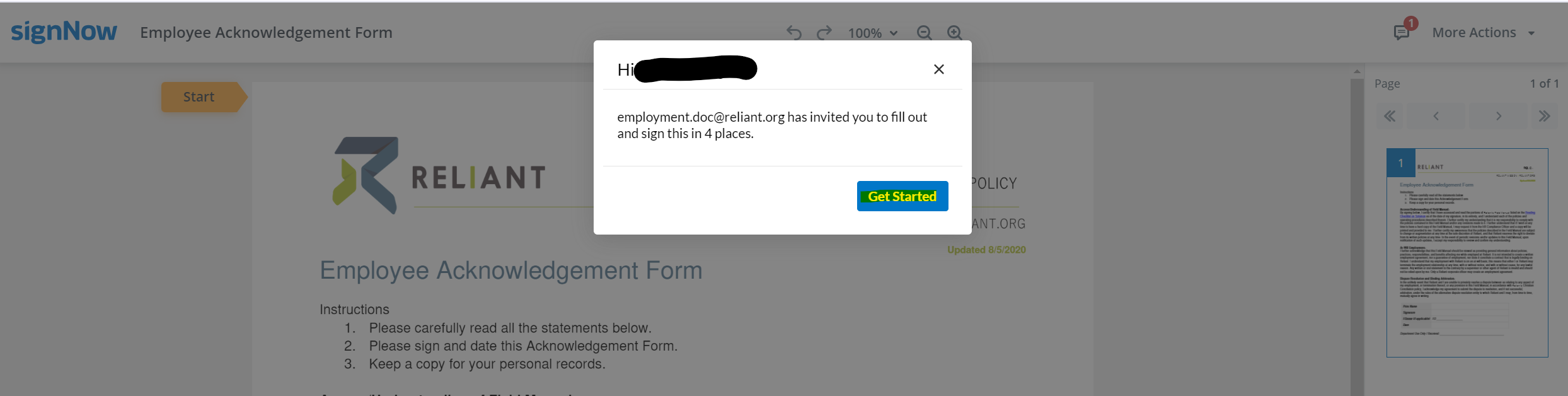
Fill out each form included in your link. Here is a list of possible forms. Click on the form title below for details and tips on filling out that form. Please follow these guidelines for filling out all forms: - Red text boxes are required fields and must be completed before submitting
- Once you have completed each box, it will turn green to know it has been completed
- Other text boxes may not be required but you may need to complete them for your hire to be correctly processed
- Read each text box carefully to ensure you type in the correct information
- Manually type into the text boxes as auto-fill features usually cannot determine the correct fields and do so incorrectly
- Use your full legal name as it appears on your Social Security Card
- By signing and submitting these forms, you are verifying that all information is correct to the best of your knowledge according to your current situation and allowing Reliant to process your hire according to the information on these forms.
- Some changes can be made after these forms are submitted. Please see the details on each individual form for when and how to make changes.
This federal tax form directs Reliant on how to handle Federal tax withholding on your paychecks. Below is an example of a filled-out Federal W4 form with instructions. Please remember to open your PAYSTUB emailed to you each month and review the amount being withheld for your taxes so that you can make adjustments to your chosen W4 options as needed. A new W-4 can be submitted at any time by following the directions on this page: Tax Info & Forms (Link to Federal W4). There is also an option to request a one-time tax adjustment (which may be the case when receiving a bonus where the additional income could send you into a higher tax threshold). STATE TAXES: If you live in a state with income taxes, you will also receive a state tax form to complete. Reliant will default to using the home address of the employee as the working address for state and local income tax subjectivity. However, in the case of those in a fixed term residency/internship, it is assumed that the employee will spend most of their time at the church/ministry partner location (rather than working from home), so the city and state of that church/ministry partner will be used for tax purposes. Some states also have local taxes for municipalities and school districts as well as other types of state taxes such as transit taxes, paid leave, or unemployment taxes. Reliant only withholds local taxes when the local jurisdiction or state requires employers to withhold. Local taxes that are optional for the employer to withhold will not be withheld by Reliant and are the responsibility of the employee to report and file on their own behalf. If an employee moves to a new state or plans to work in another state for more than a month, the employee bears full responsibility to notify Reliant of a move or change in tax withholding location. |
Step 1: Enter Personal Information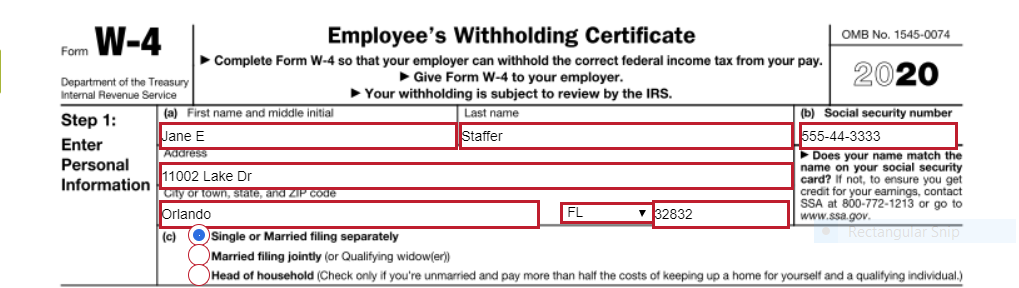
Section (a) - please fill in the appropriate information requested for each box. Be sure to double check your data entry for accuracy.- First name and Middle Initial
- Last Name
- Address
- City
- State
- Zip Code
Section (b) Section (c) - Select ONE box that best describes your Federal tax filing status
- Single or Married filing jointly
- Married filing jointly
- Head of Household (see instructions before selecting this box)
Steps 2, 3, and 4 below are optional but may be helpful depending on your tax situation. Select items that apply to you to help our system better estimate your federal tax withholding amount. If the below additional options do not apply, proceed to Step 5: Signature 
Step 2: Multiple Jobs or Spouse Works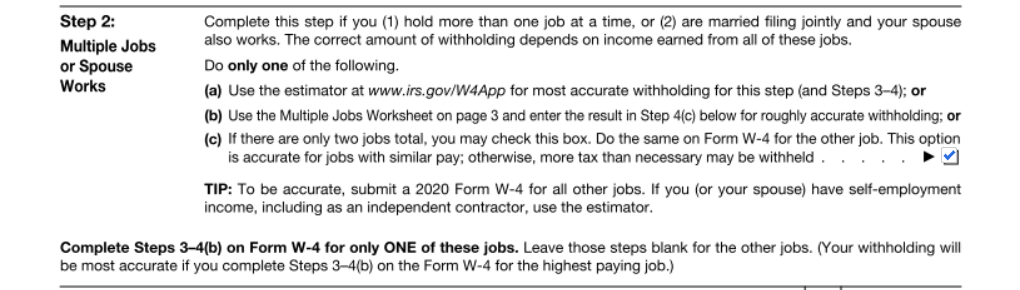
- If you (1) hold more than one job at a time, or (2) are married filing jointly and your spouse also works, you may choose to check box (c) if there are two jobs total for your household and if those jobs are similar in pay. Otherwise, you may elect to leave this box unchecked.
- Note: Reliant cannot advise you on this selection so please make sure you read the instructions carefully and seek outside professional tax assistance if needed.
Step 3: Claim Dependents:
- Multiply the Number of qualifying children under age 17 by $2,000
- See example above, 1 child = $2,000
- Multiply the number of other dependents by $500
- See example, enter $500 for a spouse that you claim (spouse doesn't work outside of the home) or for an older dependent like a special needs adult living in your household
- Add the amounts from both boxes above and enter the total on line 3
Step 4: Other Adjustments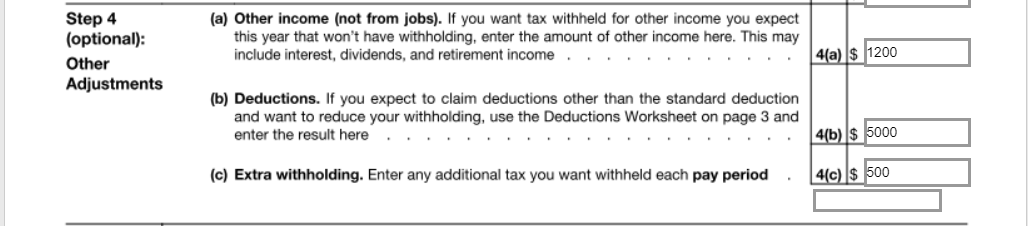
4(a) Other Income (not from jobs)This box may be used to indicate additional withholding you want withheld annually to cover other sources of income on which you will pay taxes, such as retirement income or investment income. See example above, if I expect to have $1200 in Capital Gains on which I'll owe taxes for the year, you may want to enter that amount in this 4(a) box.
4(b) Deductions This box may be used to indicate deductions that you anticipate in excess of the standard deduction amount. See example above, if I expect to have itemized deductions that exceed the standard deduction amount by $5,000, I would enter $5,000 in this 4(b) box. - Note: If you anticipate taking the standard deduction when filing your taxes, leave this box blank.
4(c)Extra Withholding - This box may be used to enter additional tax you want withheld each pay period
- Note: Reliant pays monthly so these extra withholding taxes would be withheld every month, in addition to your normal taxes for that paycheck.
- Commissioned/Ordained Ministers may choose to utilize this box to indicate an amount they want withheld as extra Federal taxes that they will use to cover their 15.3% SECA (Social Security/Medicare) obligation, since Reliant does not withhold FICA taxes for these employees. See Paying SECA Taxes.
Requesting EXEMPTION from Federal Tax Withholding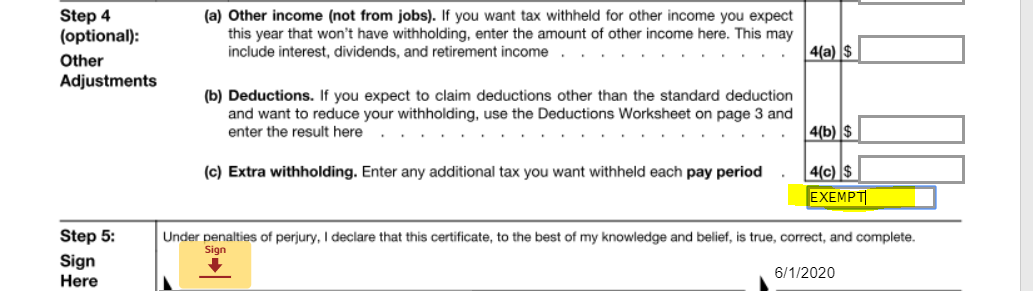
- To claim exemption from federal tax withholding due to Foreign Earned Income Exclusion or other qualified reasons, the W-4 instructions say write “Exempt” in the space below Step 4(c). Then, ensure you have completed Steps 1a, 1b, and 5. There is an "Optional" Box on the form for you to indicate this EXEMPT selection.
- See example above, please Type in "EXEMPT" to elect this tax setting.
- Do not complete Steps 2-4 on the form if claiming exemption.
Step 5: Sign Here
- See example above, by selecting "sign" and entering a digital signature this will complete your acknowledgement/submission of this form.
|
This form contains detailed information about the terms of employment with Reliant. |
Signature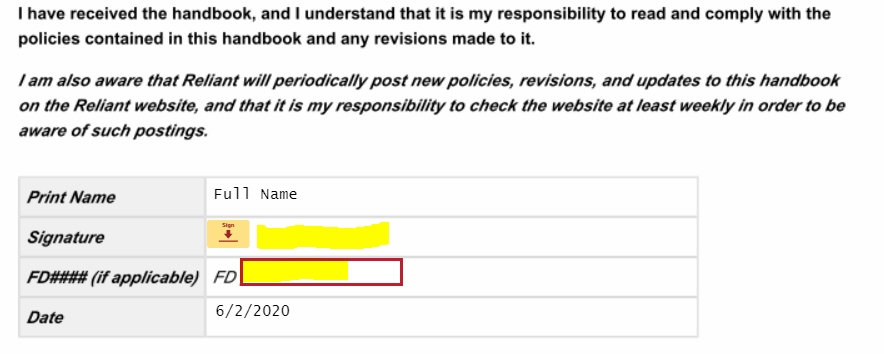
- Please read the entire text
- By selecting "sign" and entering a digital signature along with typing in your 4-digit MTD FD# this will complete your acknowledgement/submission of this form.
|
This form may be included for Reliant employees serving in the United States who are benefits eligible. If you need to make any benefits selections before your hire, please email benefits@reliant.org. |
Section A: Complete with general information about yourself in the red boxes. 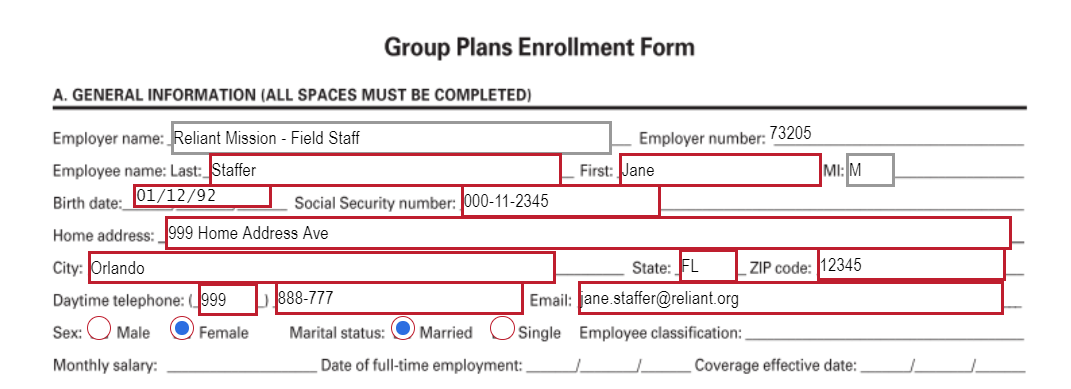
Section B: - If you are enrolling in coverage, you will select " yes " then select who you are enrolling in coverage and what plan you would like.
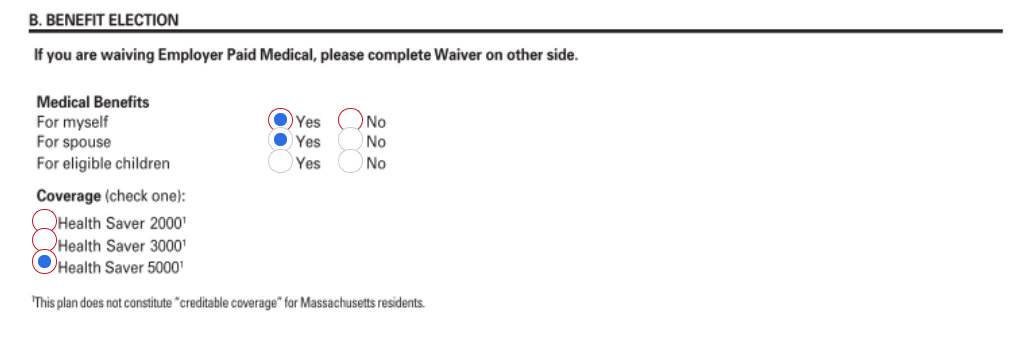
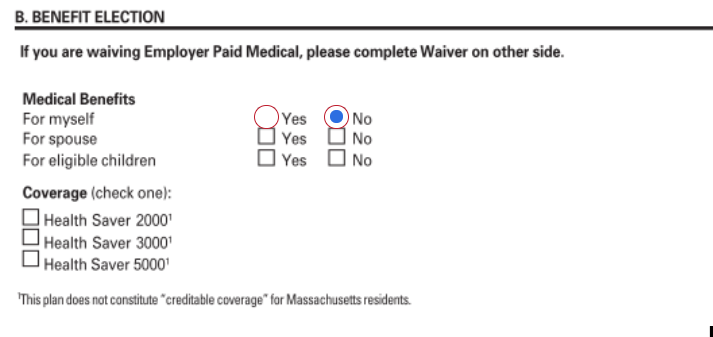
- If you are waiving coverage because you are covered under another insurance policy (see Medical Insurance Waiver Options ),you will select "no" and it will take you to Section D
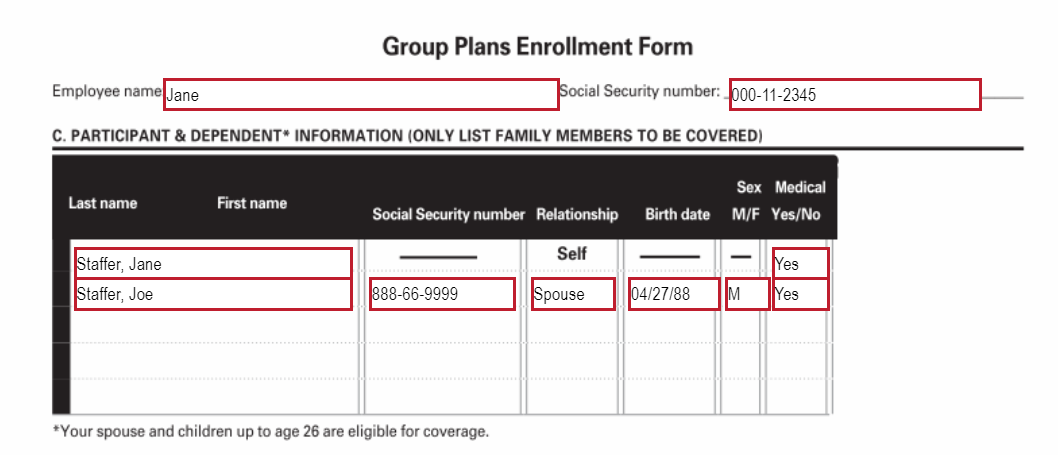
Section C : If are enrolling in coverage, complete this box with who will be on your plan. Then it will take you to Section E to sign and submit. | If you are waiving coverage DocuSign will take you to Section D |
Section D : If you are waiving medical coverage - Select the waivable reason from the drop down menu below.
- Other Individual Coverage
- Other Group Coverage
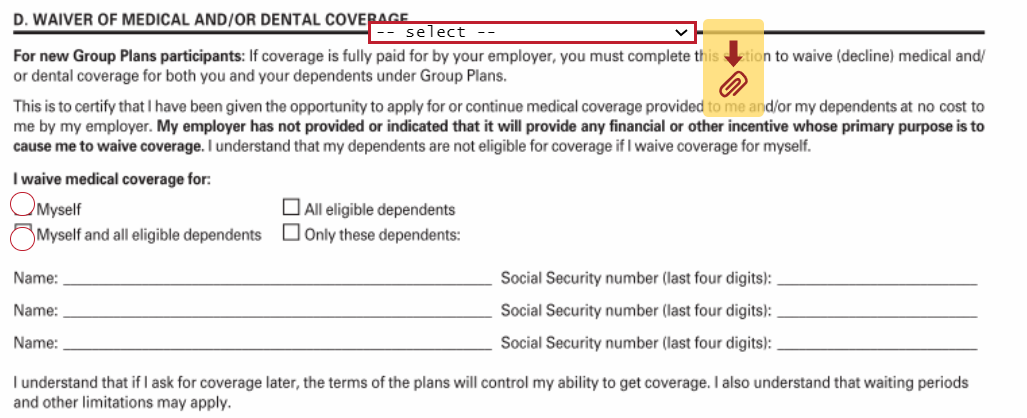 - Select who you are waiving coverage for

Section E : Sign the form. 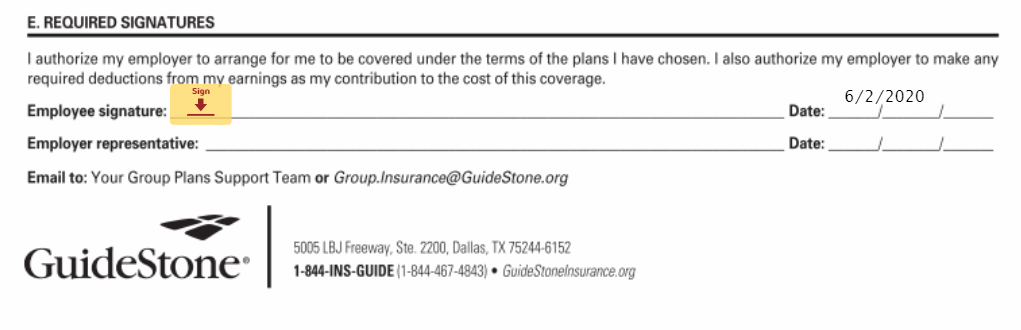 |
This form may be included for benefits-eligible Reliant employees serving in the United States. Dental coverage is an optional coverage that employees may choose to enroll in or decline coverage. See Dental Insurance - Coverage and Rates for additional information about this coverage. If you need to make any benefits selections before your hire, please email benefits@reliant.org. |
Enrolling in/Declining Voluntary Dental Coverage: 
Select from the Drop Down menu options: - "I want to enroll in dental coverage."
- "I DO NOT want to enroll in dental coverage."
- The drop down box will remain blank but your selection will allow you to skip completion of the form (if declining coverage) or additional red text boxes will appear (if enrolling in coverage)
Enrolling in Dental Coverage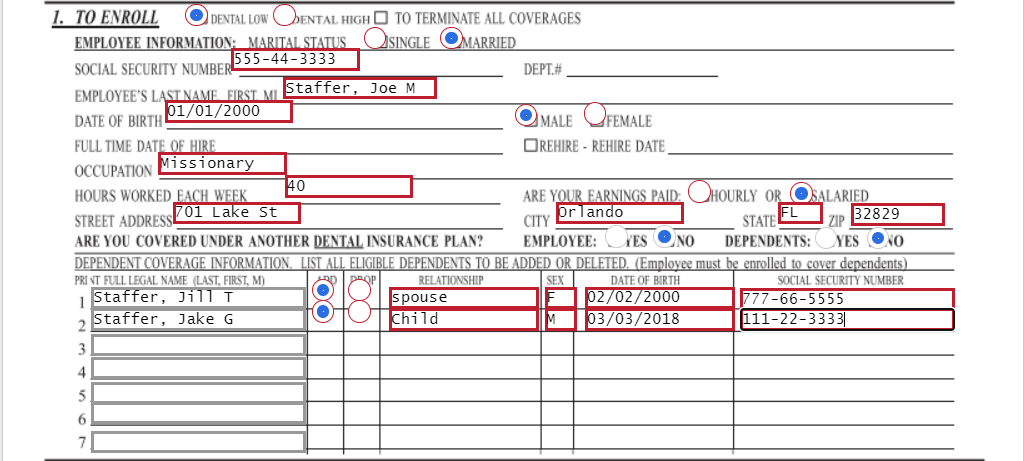
- Select the plan you want to enroll in:
- DENTAL LOW (Tier One "Low" Plan, Dental 1250)
- DENTAL HIGH (Tier Two "High" Plan, Dental 1500)
- Marital Status
- Social Security Number
- Employee's Last Name, First, MI (Middle Initial)
- Date of Birth
- Male/Female
- Occupation: Use Missionary or Pastor etc.
- Hours worked per week
- Are your earnings paid Hourly/Salaried
- Street Address
- City
- State
- Zip
- Question: Are you covered under another Dental Insurance Plan? Yes/No
- Question: Dependents (Are they covered under another Dental Insurance Plan?) Yes/No
- Dependent Coverage information: Fill in Required fields for all dependents being covered on this dental plan
- Full Legal Name (Last, First, MI)
- Select: ADD
- Relationship: Type Spouse or Child
- Sex: M/F
- Date of Birth
- Social Security Number
Signature
- By selecting "sign" and entering a digital signature this will complete your submission of this form.
You will still need to sign the document even if you select not to enroll in coverage. |
|
This form may be included for Reliant employees serving overseas. If you need to make any benefits selections before your hire, please email benefits@reliant.org. |

|
This form may be included for benefits-eligible Reliant employees serving in the United States or overseas. The purpose of this form is to designate beneficiaries for required life insurance coverage with Reliant. See Group Life and Voluntary Life Insurance for more details on this coverage. Beneficiary changes can be mad at any time by submitting a new form according to the information on the previously linked page. |
Top Section: Enter your Information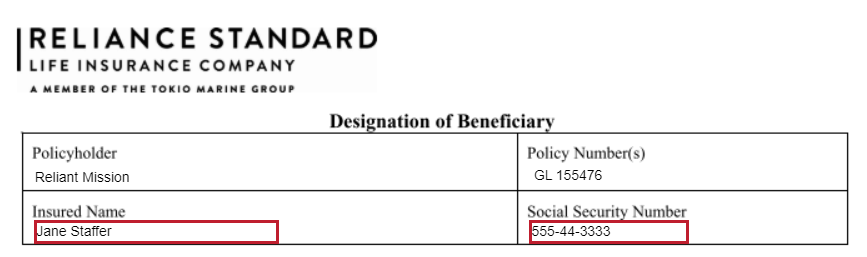
- Insured name: (Your Name) First Name Last Name
- Social Security Number: Your Social Security Number
Middle Section: Enter the Information of your BeneficiariesPrimary Beneficiary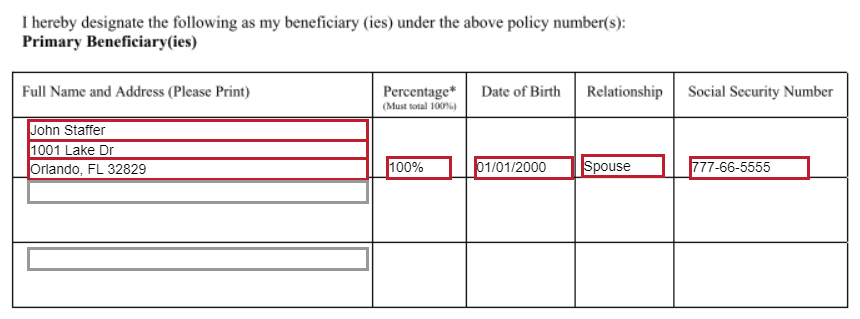
If you want to elect more than one Primary or Contingent Beneficiary, enter their name in the optional box, and the remaining required cells will populate. Remember that the divided percentage must total 100%. |
- Full Name and Address: Enter the Full Name (First Name Last name) and Address of the person you are selecting as your Primary Beneficiary
- Percentage: Enter 100% (*see details above if you'd like to name more than one Primary Beneficiary)
- Date of birth: Enter your Primary Beneficiary's date of birth
- Relationship: Enter your Primary Beneficiary's relationship to you - Ex. Spouse, Child, Parent, Friend Etc.
- Social Security Number: Enter your Primary Beneficiary's Social Security Number (if choosing a church/charity, enter the organization's Tax ID Number)
Contingent Beneficiary - This is the alternate beneficiary, used only if the Primary Beneficiary is unable to claim the life insurance payout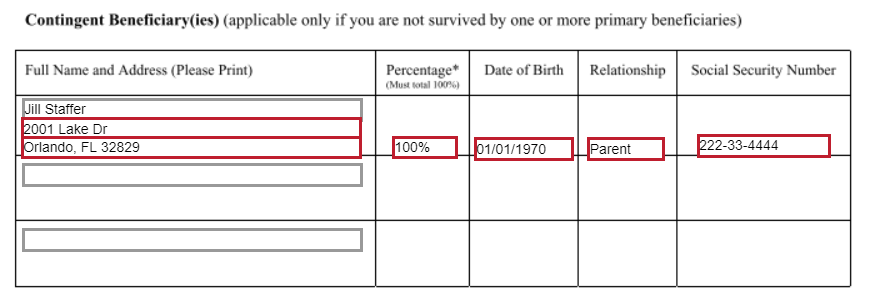
- Full Name and Address: Enter the Full Name (First Name Last name) and Address of the person you are selecting as your Contingent Beneficiary
- Percentage: Enter 100% (*see details above if you'd like to name more than one Contingent Beneficiary)
- Date of birth: Enter your Contingent Beneficiary's date of birth
- Relationship: Enter your Contingent Beneficiary's relationship to you - Ex. Spouse, Child, Parent, Friend Etc.
- Social Security Number: Enter your Contingent Beneficiary's Social Security Number
Signature
- By selecting "sign" and entering a digital signature this will complete your submission of this form.
|
This form may be included for Reliant employees serving in the United States or overseas. This form is ONLY to be filled out if you are electing OPTIONAL voluntary life insurance coverage - See Group Life and Voluntary Life Insurance for premium rates and more details on this benefit. Please note monthly premiums for this elected coverage will be deducted from the employee's paycheck. If you need to make any benefits selections before your hire, please email benefits@reliant.org. |
Declining Voluntary Life Coverage: 
- Select from the Drop Down menu: "I do not want to purchase additional voluntary life insurance coverage."
Electing Voluntary Life Coverage:
- Select from the Drop Down menu: "I am electing to purchase additional voluntary life insurance coverage."
Employee/Member Information: Complete these fields with YOUR Personal Information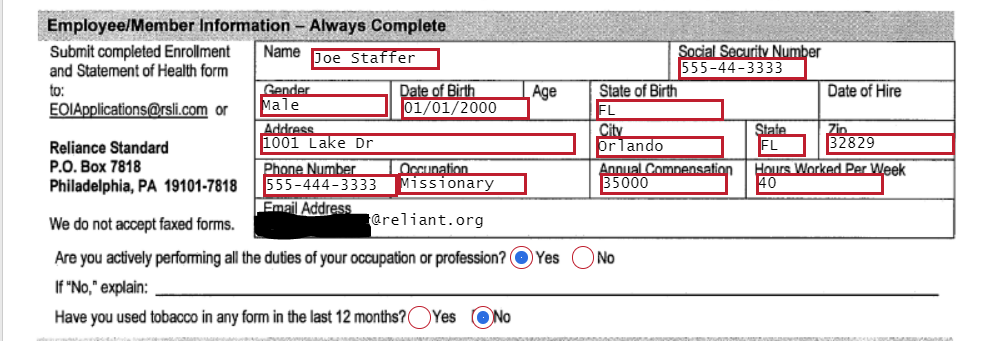
- Name: (Your Name) First Name Last Name
- Social Security Number
- Gender: Male/Female
- Date of Birth
- State of Birth
- Address
- City
- State
- Zip
- Phone Number
- Occupation: Use Missionary or Pastor etc.
- Annual Compensation: Use the annual salary you are accepting from Reliant
- Hours worked per week
- Email address: This should auto-fill
- Question: Are you actively performing the duties of your occupation or profession? Select "Yes"
- Question: Have you used tobacco in any form in the last 12 months? Select the appropriate answer - Yes/No
Coverage Elected and Amounts: Select the Amounts and Types of Coverage from the options provided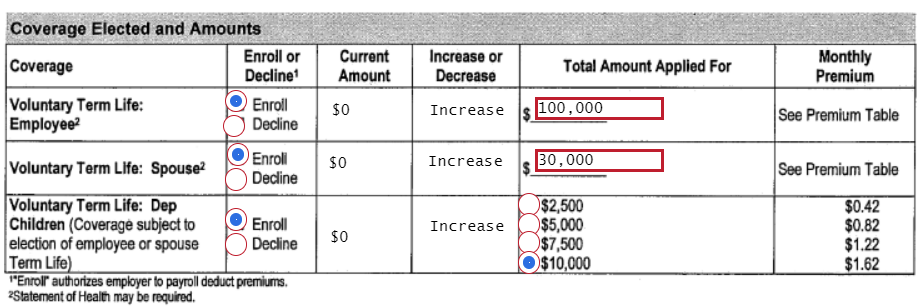
Voluntary Term Life Coverage Employee- This is additional Life insurance to cover you, the employee.
- Select Enroll/Decline per your preference
- Note: you may elect up to $100,000 in guaranteed coverage. For greater amounts of coverage RSLI may seek evidence of insurability. Contact Employment Services for information about this benefit.
Voluntary Term Life Spouse
- This is additional Life insurance to cover your spouse
- Select Enroll/Decline per your preference
- Note: you may elect up to $30,000 in guaranteed coverage. For greater amounts of coverage RSLI may seek evidence of insurability. Contact Employment Services for information about this benefit.
- Once you Select "enroll" for this coverage you will then need to go back and complete the section above titled: Spouse Information (it will appear with red text boxes when you select "Enroll")
- Spouse Name
- Gender
- Date of Birth
- State of Birth
- Address
- City
- State
- Zip
- Question: Has your spouse used tobacco in any form in the last 12 months? Select the appropriate answer - Yes/No
Voluntary Term Life Dependents- This is additional Life insurance to cover your dependents (children 26 years of age and younger).
- Select Enroll/Decline per your preference
- Note: you may elect up to $10,000 in guaranteed coverage.
|
|
|