Welcome to Solomon!

Enter the Access Code below

Access code is invalid

Solomon Logo

Versions Compared

Key

  • This line was added.
  • This line was removed.
  • Formatting was changed.

...

UI Expand
titleGoogle Sheets
  1. Click on In the cell next to "Supervisor Name"  box, and Signature," type in your full First and Last name.

Image Added

2. Open a Comment box for that cell using one of the options below.

    1. Select the "Supervisor Name" cell and use the shortcut CTRL+ALT+M or the Apple equivalent
    2. Right-click the "Supervisor Name" box and select "
  1. insert comment
    1. Comment". 
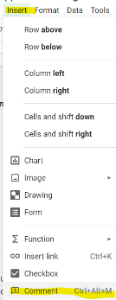
    2. Select the "Supervisor Name" box and select the "Insert" menu, then "Insert Comment".

Image Modified


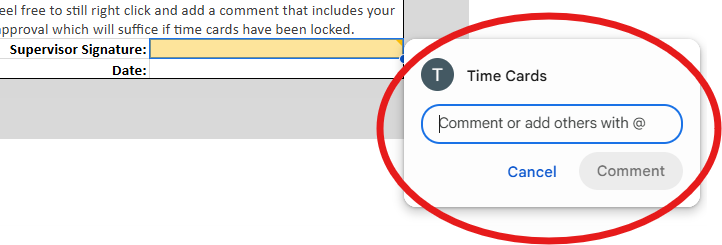
3. Type in the comment box stating  "I approve this

(Insert type of request) for (Missionary Name)" and click the blue Comment button to submit your comment.Image Removed
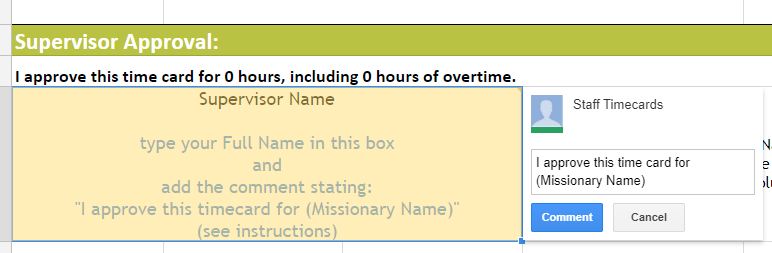
time card for {Employee Name}." Select the "Comment" button to submit your approval to the Reliant time card inbox. 

Image Added

Note
titleNOTE TO SUPERVISORS:

If for any reason the cell for your name or the date are locked, and you are unable to type in them, this is likely because the deadline has passed for when we had to lock time cards in order to begin importing hours into our payroll system.

Please feel free to still right click and add a comment that includes your approval which will suffice if time cards have been locked. 


4. Add the Date to the cell below your name.


UI Expand
titleEmail


Info

If you have a reliant.org email, you must use that account. If you do not, please use the primary email Reliant has on file, usually the email associated with your reliant.org log in. 

Send an email to the reliant.org inbox that requested the approval stating: "I approve this (Insert type of request) for (Missionary Name)".

...