
It will ask you to create a copy- make sure the copy opens in your Reliant Google Drive.
We understand that many of you already have Google email addresses, whether they are personal addresses, ones through school, or ones through your church. However, to submit reimbursement forms through our Google Drive process, it is required that you submit using your Reliant email address (which is run on Google's systems but has additional features for non-profit organizations like Reliant). Using your Reliant email address validates the email address for audit purposes (proving the email was submitted from an email address assigned exclusively to you) and replaces the need for an e-signature. |
To fully complete the form, you will need to upload your Expense Receipts to a shared Google Folder.
Once you have completed filling out the Expense Submission Form, you will need to share the form with reimbursements@reliant.org in order to complete the submission.
Comments with Requests
At times, corrections or additions will be requested before an expense submission form can be received for processing. You will be notified through a google comment (you should receive a notice via email that a comment has been added to the expense submission form) that changes are being requested.

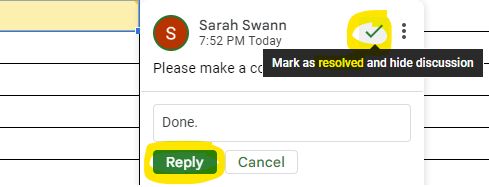
Remember to never make a copy of a submitted form. There are many reasons, but one reason, for example, is that a copy of a completed submission will now say SUBMITTED as its status. This causes confusion for the reimbursement team to know whether or not this is a duplicate submission. There is also an OFFICE USE ONLY tab that has many instructions for the Reliant reimbursement team related specifically to the expenses on this form that will need to change per each submitted form. If you need to submit a new form please go back to the Solomon page and download a new form. This also ensures that you always receive the most up-to-date copy of the form in case changes have been made to the template. |