


Page History

How do I search
...
?
...
How do I navigate around
...
?
How do I find forms
...
?
How do I find links within a page
...
?
For assistance, problems, or questions, please get in touch with your Program Team.
| Anchor | ||||
|---|---|---|---|---|
|
Search
After logging in, you will see the FIELD MANUAL tab. Click on the down arrow and then select the space you would like to open.
...
| Anchor | ||||
|---|---|---|---|---|
|
Navigation
Once you click on a name of a page after searching, you will see a list on the left side of the page that includes pages and links available in the space.
...
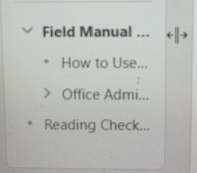
You can get the list of pages back by clicking on the right side of the column of the page tree. You will see a double line, and you can then drag the column back to the right.
 File tree icon
| Anchor | ||||
|---|---|---|---|---|
|
Forms
Solomon is home to all of our forms that used to be housed on our historical legacy websites.
...
The great part about Solomon is that we can now have information, policies, and forms all on the same page. So we suggest that rather than just going straight to a form, you search for the topic to find the page with information as well as the form to confirm that you are using the correct form and any other useful information, such as "do I have the correct form" or " how to submit the form," etc.
| Anchor | ||||
|---|---|---|---|---|
|
Links
Solomon is able to connect to other pages in Solomon within a page, to forms, google documents, outside websites, etc. Whenever you see blue letters on a page, you know that you have found a link. (Ex. Forms for Employee Policies)
...
On some pages, you will see a picture of a document. That picture is also a link to download the document. It would look like this: ...
Statement of Faith
| View file | ||||
|---|---|---|---|---|
|
...
