


Page History
...
| Info | ||
|---|---|---|
| ||
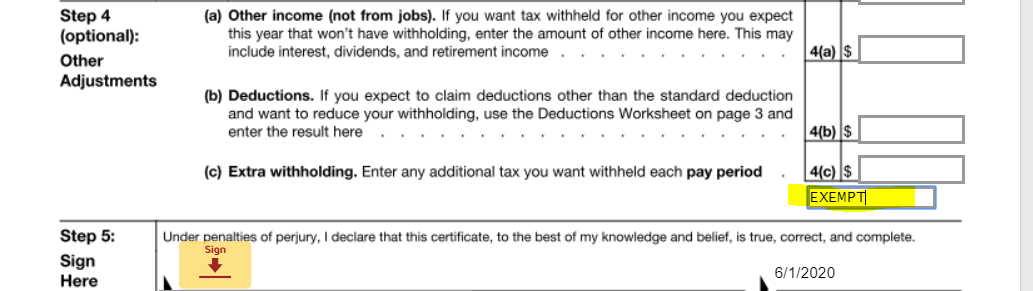
To claim exemption from federal tax withholding due to Foreign Earned Income Exclusion or other qualified reasons, the W-4 instructions say write “Exempt” in the space below Step 4(c). Then, complete Steps 1a, 1b, 1c, and 5. Do not complete any other steps. |
Federal W4 Form
| UI Expand | ||
|---|---|---|
| ||
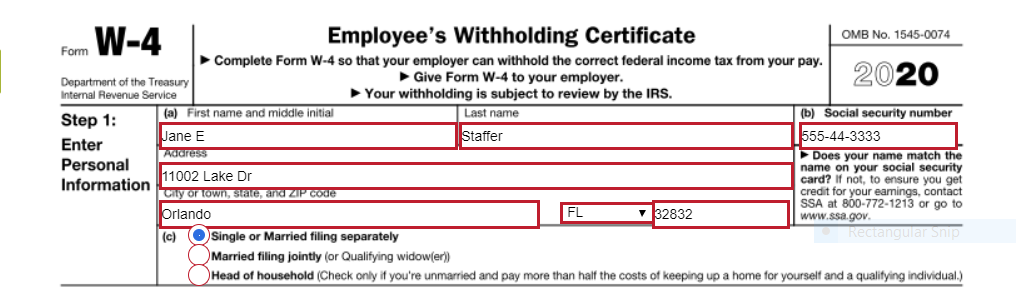
Step 1: Enter Personal Information
Section (a) - please fill in the appropriate information requested for each box. Be sure to double check your data entry for accuracy.
Section (b)
Section (c)
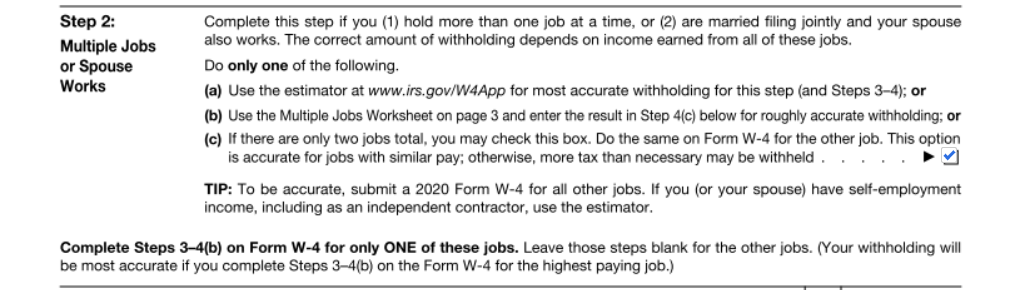
Steps 2, 3, and 4 below are optional but may be helpful depending on your tax situation. Select only items that apply to you to help our system better estimate your federal tax withholding amount. SEE THE GREEN TIP BOX ABOVE FOR MORE HELPFUL TIPS! If the below additional options do not apply, proceed to Step 5: Signature Step 2: Multiple Jobs or Spouse Works
Step 3: Claim Dependents:
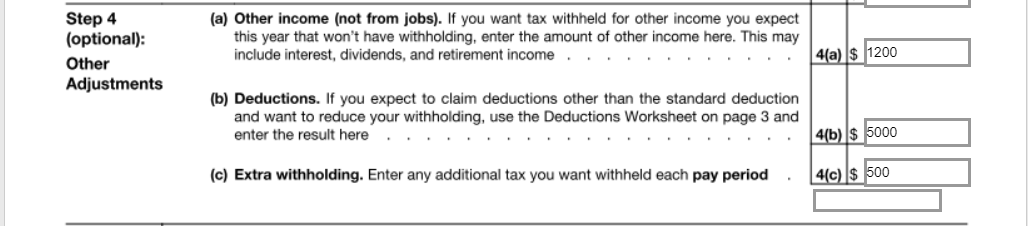
Step 4: Other Adjustments
Requesting EXEMPTION from Federal Tax Withholding
Step 5: Sign Here
|


...
| UI Button | ||||||||||
|---|---|---|---|---|---|---|---|---|---|---|
|
...
State Tax
...
Form
If you live in a state with income taxes to withhold, Reliant will send you a state W4 to complete. Reliant will usually default to using the home address of the employee as the working address for state income tax subjectibility. However, in the case of those in a fixed term residency/internship it is assumed that the employee will spend most of their time at the church/ministry partner location (rather than working from home) so the city and state of that church/ministry partner will be used for tax purposes.
Federal Tax Changes
In the case that an employee wants to make a one-time Federal tax change to a certain paycheck (without making a permanent change to their federal withholdings), the employee may send an email to payroll@reliant.org by the last day of any given month in order to affect the following month's paycheck. The email should be from the employee's @reliant.org email account and must clearly state how much money the employee would like withheld for the specific pay date. This one-time time adjustment option can be helpful to use when an employee is receiving a bonus that will increase their tax threshold for the month.
For example, an employee could send an email stating "From my XX/XX/XXXX (Month/Day/Year) paycheck, please withhold $X (specify the dollar amount) in Federal taxes".
State Taxes One Time Change
If an employee moves to a new state or plans to work in another state for more than three consecutive monthsa month, the employee must complete a State Withholding Allowance Certificate if the new state requires such a certificate. To notify Reliant of a move or change in tax working location, please complete the Contact Info Change Form - US. or Contact Info Change Form - International and the payroll team will reach out with any required forms based on your new address. Employees bear full responsibility to submit the certificate by the 16th day of the first month in which the employee is working in the new state.
To submit an updated state tax form if you have not moved, please email email payroll@reliant.org with with your request and payroll will email you a link to a new state W4 form.
State and Local Taxes One Time Change
Some states also have local taxes for municipalities and school districts as well as other types of state taxes such as transit taxes, paid leave or unemployment taxes. Reliant only withholds local taxes when the when the Local Jurisdiction or State requires employers to withhold. Local taxes that are optional for the employer to withhold will not be withheld by Reliant and are the responsibility of the employee to report and file on their own behalf. If an employee lives in a locality with a required tax, the employee must notify Reliant of the local tax and submit the appropriate withholding form (if applicable) for Reliant to withhold taxes. Please do so by submitting the Contact Info Change Form - US. or Contact Info Change Form - International and the payroll team will reach out with any required forms
One-Time Tax Adjustments
In the case that an employee wants to make a one-time Federal tax change to a certain paycheck (without making a permanent change to their federal withholdings), the employee may send an email to payroll@reliant.org by the last day of any given month in order to affect the following month's paycheck. The email should be from the employee's @reliant.org email account and must clearly state how much money the employee would like withheld for the specific pay date. This one-time time adjustment option can be helpful to use when an employee is receiving a bonus that will increase their tax threshold for the month.
For example, an employee could send an email stating "From my XX/XX/XXXX (Month/Day/Year) paycheck, please withhold $X (specify the dollar amount) in Federal taxes".
State and Local Taxes One-Time Change
Usually, these taxes are based on a percentage of the employee wages, and the amounts are typically not adjusted. based on your new address. Employees bear full responsibility to submit the certificate by the 16th day of the first month in which the employee is working in the new locality.
End of Year W-2s and Tax Documents
...
