Welcome to Solomon!

Enter the Access Code below

Access code is invalid

Solomon Logo

Versions Compared

Key

  • This line was added.
  • This line was removed.
  • Formatting was changed.

...

UI Expand
titleExample of a filled-out form with instructions.helpful tips

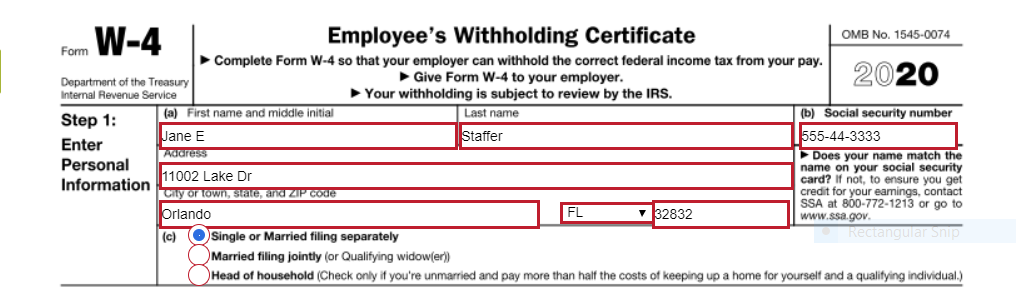
Step 1: Enter Personal Information

Section (a) - please fill in the appropriate information requested for each box.  Be sure to double check your data entry for accuracy.

  • First name and Middle Initial
  • Last Name
  • Address
  • City
  • State
  • Zip Code

Section (b) 

  • Social Security Number 

Section (c) 

  • Select ONE box that best describes your Federal tax filing status
    • Single or Married filing jointly
    • Married filing jointly
    • Head of Household (see instructions before selecting this box)

Steps 2, 3, and 4 below are optional but may be helpful depending on your tax situation. Select only items that apply to you to help our system better estimate your federal tax withholding amount. SEE THE GREEN TIP BOX ABOVE FOR MORE HELPFUL TIPS! If the below additional options do not apply, proceed to Step 5: Signature

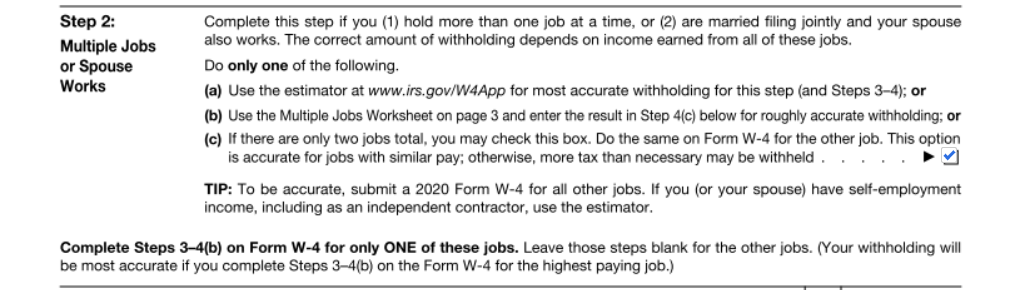
Step 2: Multiple Jobs or Spouse Works

  • If you (1) hold more than one job at a time, or (2) are married filing jointly and your spouse also works, you may choose to check box (c) if there are two jobs total for your household and if those jobs are similar in pay.  Otherwise, you may elect to leave this box unchecked.  
  • Note: Reliant cannot advise you on this selection so please make sure you read the instructions carefully and seek outside professional tax assistance if needed. 

Step 3: Claim Dependents:

  • Multiply the Number of qualifying children under age 17 by $2,000 
    • See example above, 1 child = $2,000
  • Multiply the number of other dependents by $500
    • See example, enter $500 for a spouse that you claim (spouse doesn't work outside of the home) or for an older dependent like a special needs adult living in your household
  • Add the amounts from both boxes above and enter the total on line 3

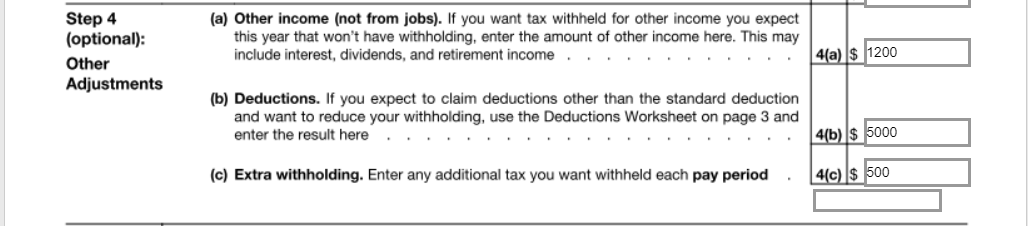
Step 4: Other Adjustments

  • 4(a) Other Income (not from jobs)

    • This box may be used to indicate additional withholding you want withheld annually to cover other sources of income on which you will pay taxes, such as retirement income or investment income.

    • See example above, if I expect to have $1200 in Capital Gains on which I'll owe taxes for the year, you may want to enter that amount in this 4(a) box.

  • 4(b) Deductions

    •  This box may be used to indicate deductions that you anticipate in excess of the standard deduction amount.

    • See example above, if I expect to have itemized deductions that exceed the standard deduction amount by $5,000, I would enter $5,000 in this 4(b) box.

    • Note: If you anticipate taking the standard deduction when filing your taxes, leave this box blank.
  •  4(c)Extra Withholding  

    • This box may be used to enter additional tax you want withheld each pay period 
    • Note: Reliant pays monthly so these extra withholding taxes would be withheld every month, in addition to your normal taxes for that paycheck.
    • Commissioned/Ordained Ministers may choose to utilize this box to indicate an amount they want withheld as extra Federal taxes that they will use to cover their 15.3% SECA (Social Security/Medicare) obligation, since Reliant does not withhold FICA taxes for these employees.  See Paying SECA Taxes

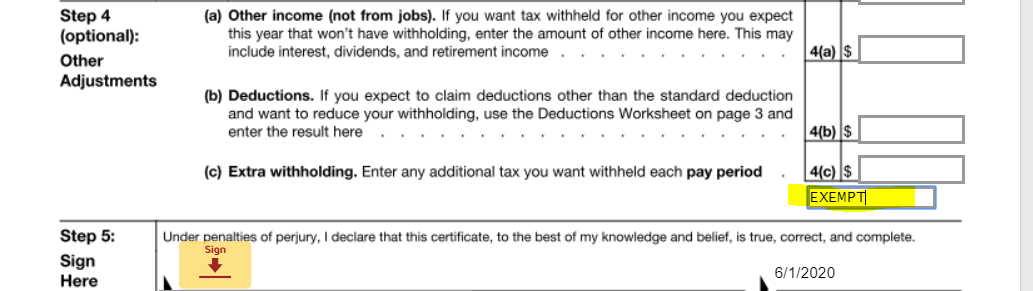
Requesting EXEMPTION from Federal Tax Withholding

  • To claim exemption from federal tax withholding due to Foreign Earned Income Exclusion or other qualified reasons, the W-4 instructions say write “Exempt” in the space below Step 4(c). Then, ensure you have completed Steps 1a, 1b, and 5. There is an "Optional" Box on the form for you to indicate this EXEMPT selection.
  • See example above, please Type in "EXEMPT" to elect this tax setting.
  • Do not complete Steps 2-4 on the form if claiming exemption.

Step 5: Sign Here

  • See example above, by selecting "sign" and entering a digital signature this will complete your acknowledgement/submission of this form.

...