Welcome to Solomon!

Enter the Access Code below

Access code is invalid

Solomon Logo

Versions Compared

Key

  • This line was added.
  • This line was removed.
  • Formatting was changed.

We are so grateful for your ... encoruage you to continue following the Lord's leading as you generously give to support Kingdom work.. Here's a guide At times, updates and generous investment in ministry. For those times when updates or changes need to be made. Here, here's how to a handy guide.  


UI Steps
UI Step

Log into your Reliant account. 

  • Select "My Account" at the upper, right corner of the website
  • Then enter your email and password and select "Sign In"

UI Step

Once signed in

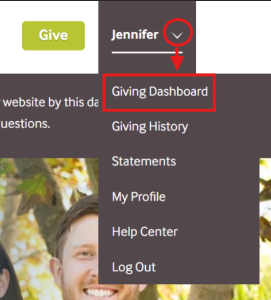
  • Locate your name in the upper, right corner of the website
  • Click the arrow next to your name
  • Select "Giving Dashboard" 

UI Step

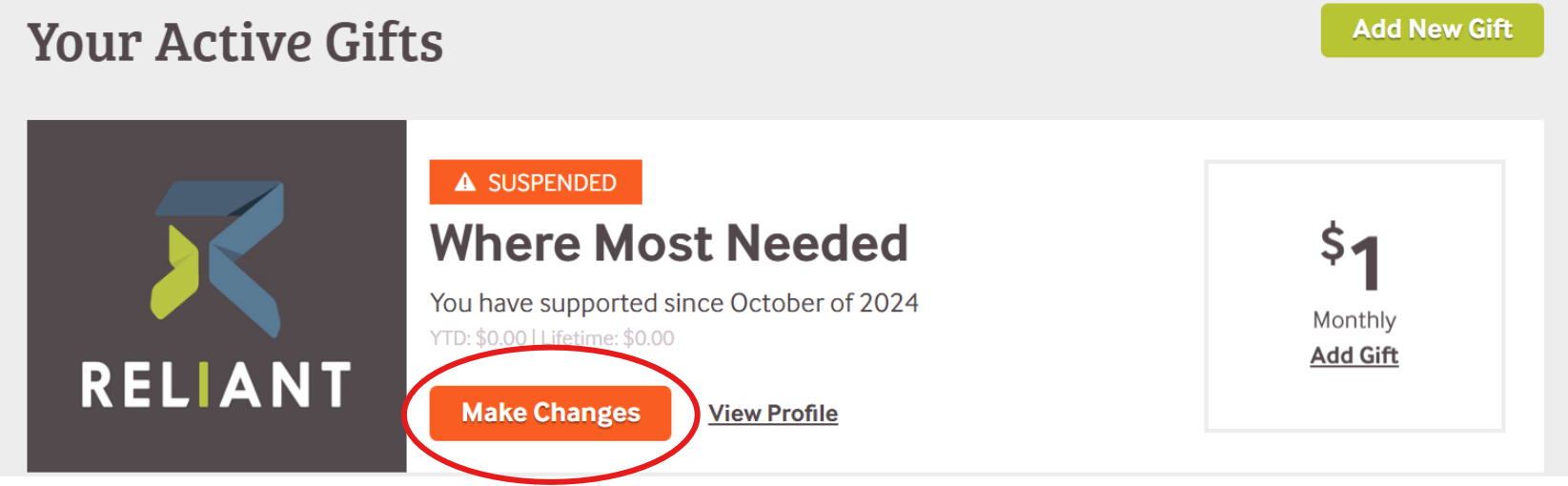
Locate the gift you want to change. 

  • Click the orange "Make Changes" button.

*If a gift is marked with an orange "Suspended" banner, that means there has been a disruption in giving. 


...