


Page History
You can If this is your first time submitting an expense on the new forms, please take a moment (or 4 minutes) to watch this tutorial video for more details on how to submit your expense submission form which includes responding to changes that the reimbursement team has requested be made. that will walk you through all the details of the form and ensure that you have no hiccups with submission.
| Widget Connector | ||
|---|---|---|
|
| Note |
|---|
Remember, to fully complete the form, you will need to upload any necessary receipts to a shared Google Folder. (Follow the link for instructions and a tutorial video.) |
You will share your filled-out form with reimbursements@reliant.org after all approvals have been received (if approvals are applicable).
- If your form is being submitted late you will first share it with your supervisor for approval.
- If your submission is for a project fund you will first share it with an authorized signer of the fund for approval.
...
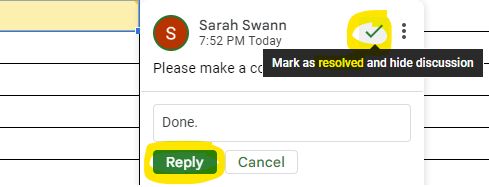
After you share your form with reimbursements@reliant.org you may receive an email back saying there are changes that need to be made. At times, corrections or additions will be requested before an expense submission form can be received for processing. You will be notified through a google comment (you should receive a notice via email that a comment has been added to the expense submission form) that changes are being requested. The video above outlines how to respond to these changes, but the steps are also outlined below.
| UI Expand | ||
|---|---|---|
| ||
|

| Note |
|---|
Remember When it comes time to make a new submission, remember to never make a copy of a previously submitted form. Always go back to the Solomon page and download a new form. Never edit and try to resubmit an already submitted form. There are many reasons, but one reason, for example, is that a copy of a completed submission will now say SUBMITTED as its status. This is that it causes confusion for the reimbursement team to know whether or not this is a duplicate submission. There is also an OFFICE USE ONLY tab that has many instructions for the Reliant reimbursement team related specifically to the expenses on this form that will need to change per each submitted form. If you need to submit a new form please go back to the Solomon page and download a new form. This Always downloading a new copy from the Solomon page, also ensures that you always receive the most up-to-date copy of the form in case changes have been made to the template. |
...
