The information below is for directors wanting to start-up a new Collegiate LT using Reliant's registration system.
Our goal is to have collected all LT info by November 15th (as soon as you hear a yes from the NEB) for a live launch of LT registration by December 16th.
| Collegiate confirms their LTs for the next summer during their NEB meeting in mid November. A new LT can not officially be set up online without the NEB's permission, but because the LT information is due so quickly after the NEB is over to be able to launch the website by mid December, paperwork is sometimes sent to the potential LT director(s) in advance. Reliant will need to set up a new fund number before the online regisitration can be launched. Once the Collegiate NEB has voted to add the new LT and the LT directors have been chosen, Greg Van Nada will need to send Dave Meldrum Green an email saying please add a new LT fund connected to our Collegiate fund and verifying the official director (or co-directors) for that LT fund. The director(s) will be then become the signers for all finances within that fund so any finanical requests made will need the approval of a signer for that fund. If the directors wish, they can request additional signers of their LT fund (ex. a finance administrator for their LT) by emailing Dave Meldrum Green. |
What information does Reliant need to be able to launch your new LT registration site?
- An LT Set Up Form template has been created on google . Each LT needs to fill out this form that asks all the questions Reliant will need answered before we can begin to set up for your LT registration. Here is an example: LT set up form template
It will include info about your LT (dates, location, etc.), names and contact info for specific leaders for your LT, finance information (fees, dates, etc.).
It will also ask for LT missionary and LT speaker info (which is needed closer to the start of your LT)
- Employment Policies Page for your LT. We need to instruct participants on how to apply both for LT and for your YMCA roles or LT job roles for non-YMCA LTs.
The employment policies page is something the students have to read while they are working on the online LT application and they must say that they have read it before they can move forward with their application.
Here is a link to the employment policies. Please send in your edits for your program each year.
Also attached by a link to this employment policy for the participants is also an instruction page for how to apply at the YMCA-How to fill out your YMCA application. Or, or non-YMCA LTs how to apply for a job in your LT location.
Here is a link to the COLT "How to fill out the YMCA..." instruction page as an example. How to fill out the YMCA application without mistakes”. Please send in your edits for your program each year.
- Orientation Packet. You will need to send an updated Orientation Packet each year.
Attached here is the sample COLT Orientation Packet to download.
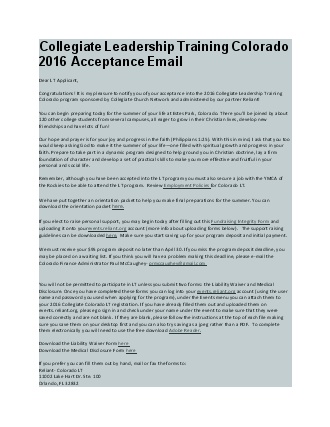
- Acceptance Email. You will need to send an updated Acceptance Email each year. If you have information that you'd like for your student to receive specifically pertaining to your LT this is the place for you to be able to add that information or links.
Attached here is a sample COLT Acceptance Email.