Policy Summary
Reliant accepts legally binding approval from our missionaries via electronic means such as email or being logged in to web applications. These kind of approvals are in lieu of a traditional "pen and ink" signature. This makes administration easier for our missionaries worldwide. Such "signatures" need to meet two conditions: - The identity of the missionary or party is securely verified. Reliant missionaries must use a password-protected, Reliant-issued account. (
 ) ) - The missionary or party clearly communicates their approval. (
 ) )
Common Examples: an email from a verified Reliant.org email account and a missionary saying "I approve this change." or a missionary logged in to a web application, who submits online while logged in and stored as a record in our database. As of the 2015 update of this policy, Reliant can no longer accept e-signatures from a personal email account. |
Background and What's New
On June 30, 2000, Congress enacted the Electronic Signatures in Global and National Commerce Act ("ESIGN"). The result of this Act made it possible for an electronic signature to be used as a valid replacement of a traditional pen and ink signature
a signature, contract, or other record relating to such transaction may not be denied legal effect, validity, or enforceability solely because it is in electronic form
In 2011, Reliant first adopted an electronic signature policy. It required an email with the sender hand typing a signature block in the body of the email and/or the body of the document that included Full Name, Home phone number (or mobile phone), Ministry Fund Number, E-Mail address, and date.
The 2015 updated policy supersedes previous policies and is updated to acknowledge:
- Identity is now primarily validated via a Reliant-issued account with a password, which means:
- Manually typing a list of information is no longer required, because we know who the missionary is if they are logged in
- Sending or approving while logged in to a valid Reliant.org account / email addresses is required. Non-Reliant accounts (e.g. a personal gmail account) can't be accepted for identity verification.
- Electronic approval is now common not only in email, but also in in web applications. For instance, within web applications, CRM recorded records, when logged in via ReliantID on our websites, or via a Google for Non-Profits account when submitting spreadsheet, form or online comment that includes identity and timestamp.
Benefits
- Make administration easier for our worldwide missionary staff and staff supervisors when submitting Reliant information, approval, documents or forms to the Headquarters office.
- Save costs for the ministry.
- Match federal regulations.
- Be in step with cultural norms for digital business.
- Increase efficiency of our office staff by skipping a paper step, which must be converted to electronic storage in any case.
Definitions
ELECTRONIC RECORD
The term means a record created, generated, sent, communicated, received, or stored by electronic means.
For Reliant, examples include: an email from a verified account, a CRM record, a stored Google document or record in a spreadsheet, a submitted web form via Google or Sitefinity, a PDF document
ELECTRONIC SIGNATURE
A technologically neutral term indicating various methods of signing an electronic message that:
- Identifies and authenticates a particular person as the source of the electronic message; and
- Indicates such person's approval of the information contained in the electronic message.
For Reliant, an item that is identified with a person includes an email from a verified Reliant.org account (as the user has used a name and password) or a record via a Reliant web application that records the name of the user. For approval, language such as "I approve" "Please make this change" "Yes, we agree" in an email is sufficient. In applications that make approval explicit, clicking a checkbox or submitting via a button could indicate approval.
Other general examples of electronic signature technologies include PINs, user identifications and passwords, digital signatures, digitized signatures, and hardware and biometric token
ELECTRONIC APPROVAL / E-SIGN
Equivalent terms for ELECTRONIC SIGNATURE.
MISSIONARY
Collective for all employed or associate missionaries—all of whom are issued a Reliant.org account.
PARTY
Any other non-missionary external party who is communicating with Reliant staff for the purposes of approval, such as a local church partner, supervisor, vendor, etc.
Cases and Details
+ = Electronic Approval
Consider these specific cases:
Attached Microsoft or PDF Documents
- A document or form in Word, Excel, or PDF formats can include an indication of missionary approval () but must be sent from a Reliant account to indicate identity ()
- Typing a full name or fund number inside a Word, Excel, or PDF document does not provide sufficient indication of identity.
- The internal process to record the submission should include the attachment document and some record of the received email to verify identity.
Google Documents from Reliant Verified Account
A Google Document, Spreadsheet, or Form submitted submitted from a verified @reliant.org Google Account verifies identity ().
A comment or interaction in the form or document can verify both identity and indicate approval.
Comments, Interactions, or Forms using any Reliant Verified Account
- A comment on a Google spreadsheet or document can verify both identity and indicate approval .
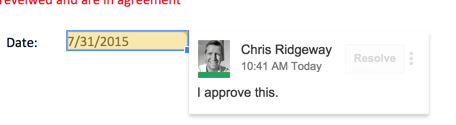
- An electronic record submitted via a Reliant website like Staffnet or Reliant.org This can be both and indicate approval
- In 2015 right now, the example would be the submitting a MTD Support Goal.
- Future example: a checkbox on staffnet
- Lots of things are available in theory here but have to be programmed.
- For office users, a comment submitted via Solomon can indicate both and indicate approval
- Interactions are usually submitted to a data source - so it is stored in CRM, in a Google spreadsheet. It could even be converted to a simple email.
Date and Time
Accepted documents or records should include the date they were approved and date received (if different).
- For email or electronic documents, this is nearly always recorded automatically and it is not required to have a "date" field alongside a signature inside a document.
- For manually signed ("pen and ink") documents, a date field is required, and internal processes should take care to note the date received if different.
Which Services are Verified By Reliant?
A Reliant-verified account is any that
- Uses a password or other secure login technology and
- Is issued, managed, and revoked by Reliant Tech Services based on Missionary Resources or Human Resources verification
In August 2015, this is currently
Verified Services for Field Missionaries
- ReliantID, our own independant login system currently used for gcmweb.org, gcmstaff.net, gcmcoach.net, gcmdev.net, mygcm.org, reliantstaff.gcmweb.org, and the future Reliant.org and events.reliant.org.
- Google Reliant Account
Verified Services for Office Staff
Both accounts above, and
- Microsoft Active Directory account + Exchange email (Outlook)
- Atlassian account for JIRA and Solomon (Confluence)
- Atlassian Hipchat
Traditional Approvals Still Accepted
Reliant still accepts traditional methods of approval including:
- Original pen and ink signature on form or document and personally submitted (with date received clearly marked by Reliant office personnel)
- or sent via postal mail.
- Scanned document or form with pen and ink signature
- Sent via email
- Uploaded or digitally transmitted by other means
- Faxed document with pen and ink signature
Email Sent from Non-Reliant Account
Reliant will accept an approval from a non-Reliant account when the party is not an employed or associate Reliant missionary or office staff member.
Keep in mind that the two general principles for electronic approval. You should
- Reasonably be able to confirm the identity of the party.
- Reasonably understand that they are positively approving
To make things easy for you, Reliant can accept your approval ("signature") electronically. Please reply to this email. Guidelines: - If you represent a church or organization, use your organizational account.
- Say "I approve" or something similar.
- If the signature includes a dollar figure, please restate. (e.g. "I approve $50")
- Type your full name and a phone number where you can be reached. (e.g. John Smith, 555-555-5555)
- Your email, including the sent date and sending email address will be recorded for our records.
|
This required information above can also be entered directly by the provider onto the actual form or document. The form or document can then be attached to an email.
Prior Application of Policy
Form and documents that were accepted by the Reliant office with electronic signatures prior to the adoption of this electronic policy are considered valid. The acceptance must be after June 30, 2000 – this was the enactment date of the ESIGN Act.
Exceptions to Policy
All documents can be approved or acknowleged via our policy except the items explicitly listed here
| Document | Reason for Exception | Required By |
|---|
| I-9 Form | I-9 forms must include a identification verification process by an approved Reliant employee. | Dave Meldrum-Green |
| W-4 Withholding Form | | Dave Meldrum-Green |
| | | |
The following Forms can be submitted using an electronic signature (including but not limited to): I. Finance Forms & Documents
• Reimbursement Form – MTD account (First signature page only)
• Reimbursement From – departmental/supervisor/manager approval (First signature page only)
• Moving Expense Form (First signature page only)
• Check Request - originator
• Check Request – departmental/supervisor/manager approval
• Salary Advance Field/International Staff
• Salary Advance HQ Staff
• Computer & Office Equipment Purchase Approval Form
• Per Diem Request
• Direct Deposit Agreement II. HR/MTD Forms & Documents • Support Goal Worksheets
• Performance Appraisals
• Education Approval Form
• Parsonage Request Form
• Bonus requests (internship bonuses, overseas special needs, etc)
• Time cards
• Leave of absence requests
• Coaching hours form
• Paid Time Off Request Form
• Backtrack Release Authorization Form
• Career Assessment Survey
• Employee Evaluation of Supervisor
• FCRA Disclosure Statement • Employment Applications III. Benefits
• 401(k) Principal enrollment Form
• 401(k) Contribution change Form
• 401(k) Rollover declaration Form
• Health Insurance Enrollment Form
• Dental Insurance Enrollment Form
• Genworth Group Life Enrollment Form
• Genworth Voluntary Life Insurance Enrollment Form
• Genworth Beneficiary Designation Form IV. Ministry Grant Forms
• Grant Request Forms
• Grant Questionnaire V. Event Forms
• All Reliant Liability, Release, Medical Permission Waiver forms
• All Reliant Medical Disclosure Forms Forms on which Reliant will NOT allow an electronic signature (must still be hand-signed). The following Reliant forms must be submitted with an actual signed signature: - Employee Handbook Acknowledgement
- I-9 Form
- W-4 Withholding Form
- Statement of Faith Agreement
- LifeLink Signup Form
- 401(k) Beneficiary Enrollment Form – initial enrollment only
|