Welcome to Solomon!

Enter the Access Code below

Access code is invalid

Solomon Logo

Versions Compared

Key

  • This line was added.
  • This line was removed.
  • Formatting was changed.

...

Tip
titleFuture Support Goal Updates

For any future updates, update your Support Goal Worksheet, which can be found in your Reliant Google folder, and reshare with international@reliant.org. You will never have to change your support goal in Toolbox after you "create" the first one. 

Excerpt
UI Steps
UI Step

Go to

UI Button
colorturquoise
titleToolbox
urlhttps://toolbox.reliant.org/account/sign-in

UI Step

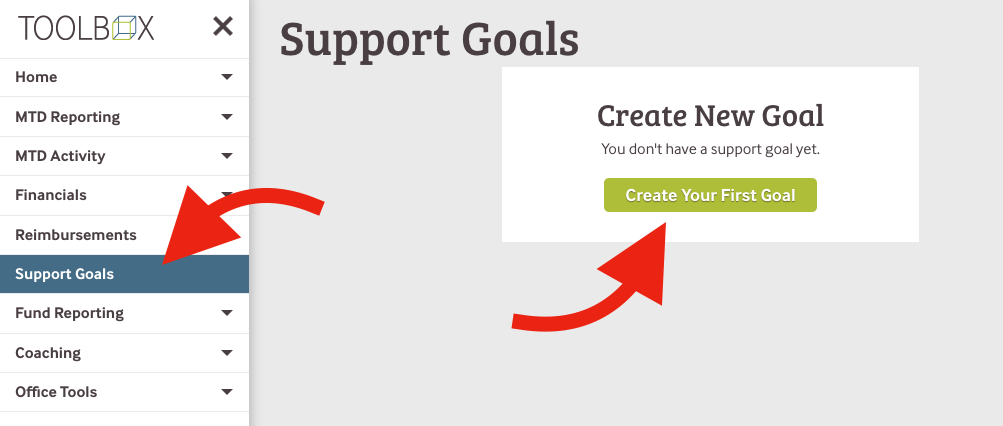
Click Support Goals > Create Your First Goal.

 Image Modified

UI Step
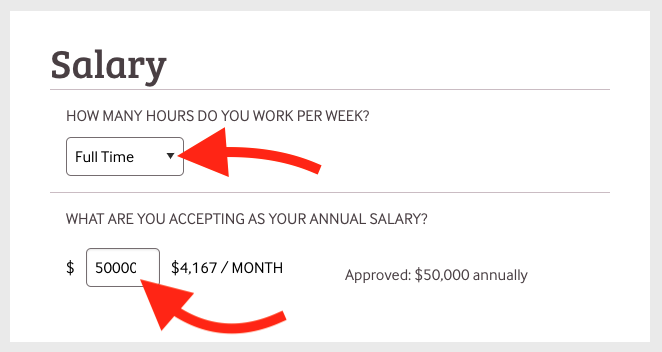
  • Select Full Time from the dropdown, even if you are Part Time. 
  • Insert your approved salary as your accepted salary. If a number is pre-filled, you can leave it as is. Do not use $ or a comma. 
    • This number is likely different than your expected or desired salary. We will correct this when we approve your support goal.

Image Modified

UI Step

Click Submit

*You can skip all of the other boxes. The international team will update all of those numbers for you.